

ABOUT US  |  CONTACT US  |  SITE MAP   |  POLICIES


Welcome to the Peacock Bros. NZ Laser Labels website


Home Page


GET A LABEL QUOTE

AVAILABLE STYLES OF LABELS
FACTS ABOUT LASER LABELS
HELPFUL HINTS ON LABEL PRINTING
LASER LABELS PRINTING GUIDE


For more labelling solutions, visit Peacocks NZ:

LABEL PRINTERS
DATA CAPTURE
LABELS & TAGS
PRINTER APPLICATORS
RFID
THERMAL RIBBONS
LABELLING SOFTWARE
SERVICE & SUPPORT
OUR VENDORS
MEDIA NEWS

Located in Australia?
Visit us today at our Australian website
www.peacocks.com.au


Peacock Bros NZ Ltd have been manufacturing A4 laser – copier – inkjet labels in our Auckland New Zealand plant for 10 years. Our A4 Labels can be used in most Laser - Copiers or Ink jet printers.

A4 self adhesive laser copier ink jet sheets can be used in many applications; mailing labels, address labels, packaging labels, carton labels, dispatch labels, identification labels, shelf racking labels, colour coding labels etc....

We also manufacture colour A4 laser - copier - ink jet labels. You can select from a variety of materials; plain paper, synthetic, gloss and removable adhesives.

Our A4 laser – copier – inkjet labels are used by many small medium and large NZ companies. We carry the largest stock range of A4 laser – copier – inkjet labels in New Zealand, this includes Matt, Gloss, Colour Coated, Permanent, Removable, Matt White & Matt Clear Synthetic. We also custom manufacture a large range of other sizes and shapes of A4 laser – copier – inkjet labels and can also custom manufacture a size, colour or custom print to suit your requirements. Our Matt White Synthetic A4 laser – copier – inkjet label material can be used outdoors.

For more information contact us at: cs@lasernz.com or Ph: (09) 273 4455


For more labelling solutions, visit us at:


Our range of stock laser labels

NB: All sizes are packaged in boxes of 250 sheets per box

     
LC1

205mm x 286mm

A full size A4 sheet -this label is suitable for custom cutting to any shape or size. Ideal for warehouse and despatch labels, diagrams etc.


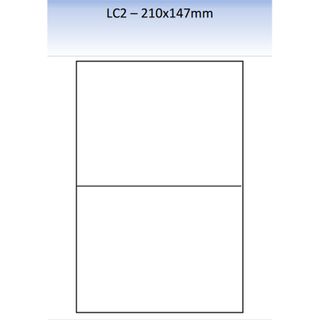
LC2

147mm x 210mm

An A5 sheet -this label is suitable for custom cutting to any shape or size. Ideal for warehouse and despatch labels, diagrams etc.


LC4

139mm x 99mm

An extra large label. Excellent for shipping or carton labels; or messages or instructions where large type is required.


LC8

105mm x 74mm

An extra large label. Excellent for shipping or carton labels; or messages or instructions where large type is required.


LC14

98mm x 38mm

A longer label, longer for bigger addresses and deeper for up to 8 lines. Ideal for other uses such as bin markers.


LC16

105mm x 37mm

An extra long, general purpose label accommodating the largest addresses easily. Ideal for other uses such as shelf or bin markers, over labelling brochures or manuals, instructions, notices etc

  LC21

63mm x 38mm

A slightly larger label for where longer address lines are required but still suitable for up to 5 lines. More versatile and suitable for other applications.

  LC24

70mm x 36mm

A slightly longer label, longer for bigger addresses and deeper; accommodating up to 7 lines. More versatile and suitable for other applications.

  LC30

64mm x 25mm

Ideal for mail and addressing purposes –although small in area (5 lines maximum)

  LC33

70mm x 25mm

Narrow 5 line deep label for general use as address labels.


Pre-made Labels templates in Word Format:

Below is a list of Laser Labels layout templates already set out for instant use when creating your labels. Please feel free to use:
- LC1 Layout sheet click here
- LC2 Layout sheet click here
- LC4 Layout sheet click here
- LC8 Layout sheet click here
- LC14 Layout sheet click here
- LC16 Layout sheet click here
- LC21 Layout sheet click here
- LC24 Layout sheet click here
- LC30 Layout sheet click here
- LC33 Layout sheet click here

Important Notice to Microsoft Office 2007 users.

When you first down load a template you will not automatically see the grid lines/label shape.
Select “Layout” which is on the far right of the Quick Access Toolbar, then select View gridlines.